A small BOS desktop, drawn in this page, to get the feel of it. Open Computer, drag a file into the Bin and bring it back, and open the Word and Excel files in Fusion, the one app for every file, here as two tabs.
Computer
This is a drawing: folders open in BOS itself.
Bin
The Bin is empty. Drag a file onto the Bin, or open a file and choose Move to Bin.
Fusion
Welcome to BOS.docx Word
Welcome to BOS
This is a Word document, open in Fusion.
Fusion opens Word documents, spreadsheets, PDFs, text and pictures in one app: each file in its own window, or as a tab if you choose, as here.
Every save keeps what it replaced, so you can go back to an earlier version.
Coffee orders.xlsx Excel
A
B
C
D
1
Customer
Coffee
kg a week
Delivery
2
Saltbush Bakery
House Blend
12
Friday
3
Wren Bakehouse
House Blend
8
Tuesday
4
Range View Hotel
Single origin
5
Monday
5
Corner Cafe
Decaf
3
Thursday
Old draft.txt Text
Price list, spring: an old draft.
Try it: drag this file into the Bin, open the Bin and restore it.
We put five files from a made-up coffee roaster into our demo and asked twelve questions. Choose one: two answers we marked fully right, two we marked partly right with what they missed, and the Graph app on the same files. Every picture is a real screen.
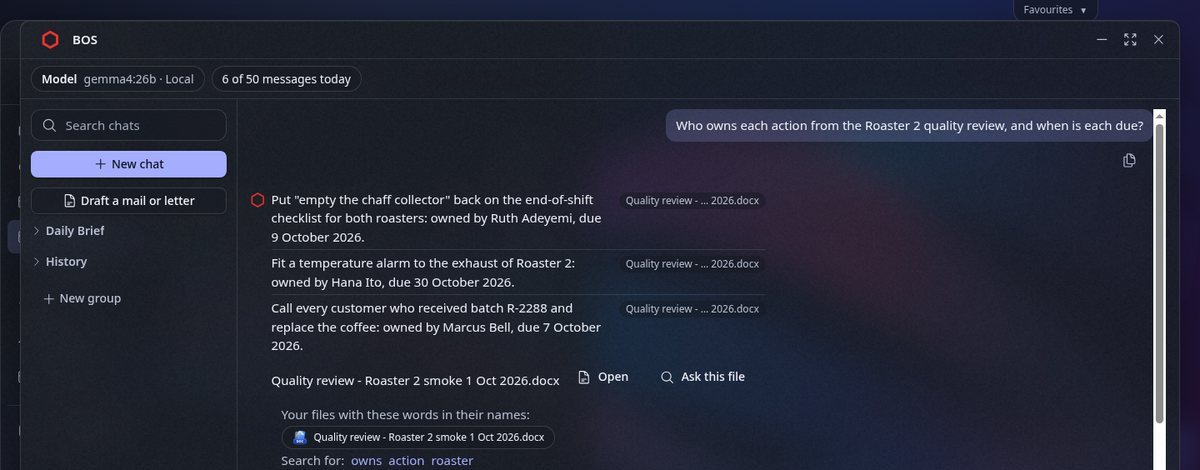
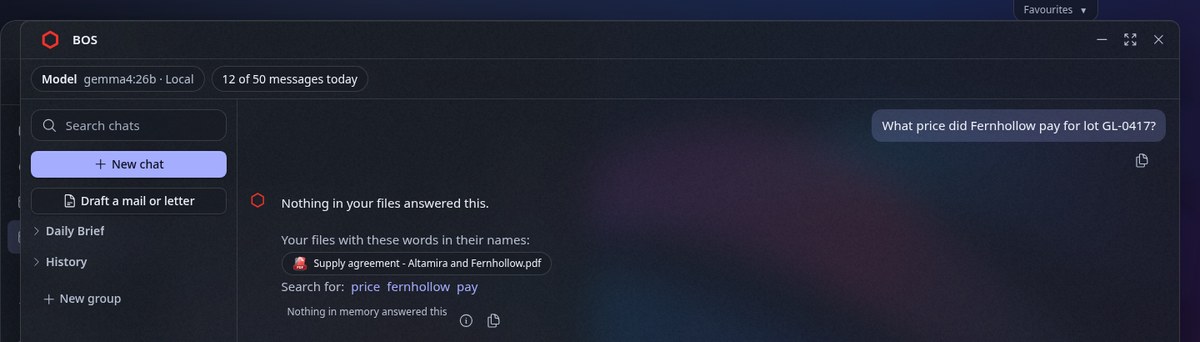
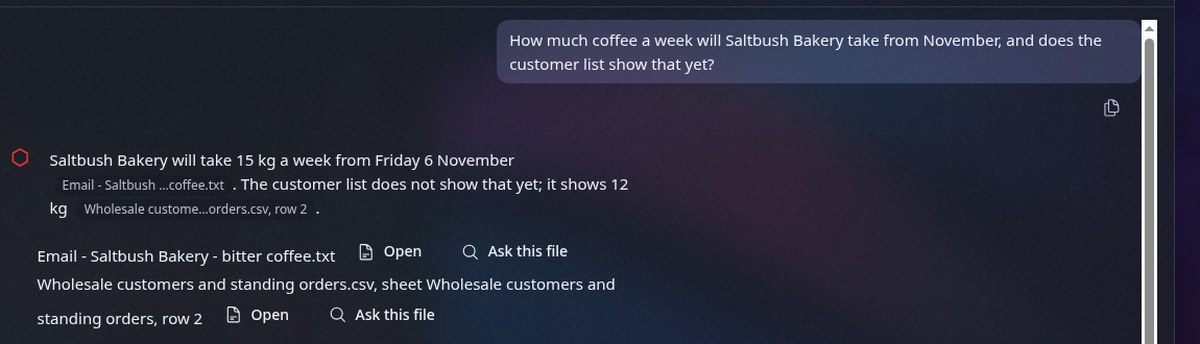
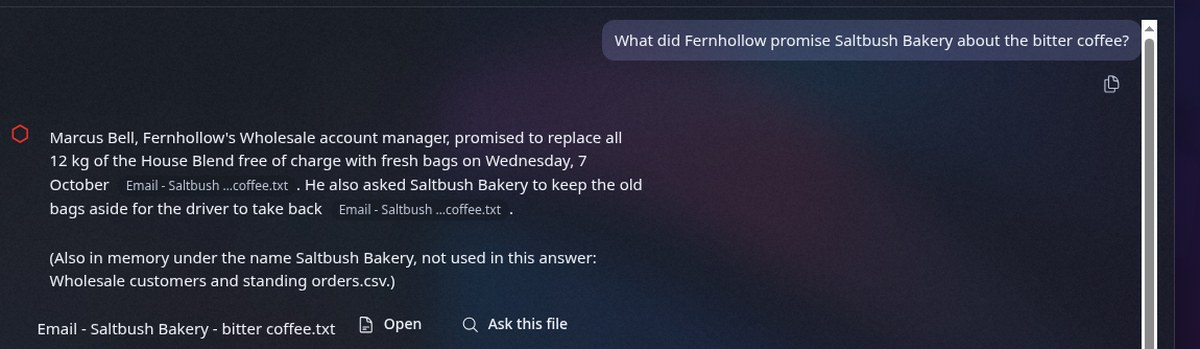
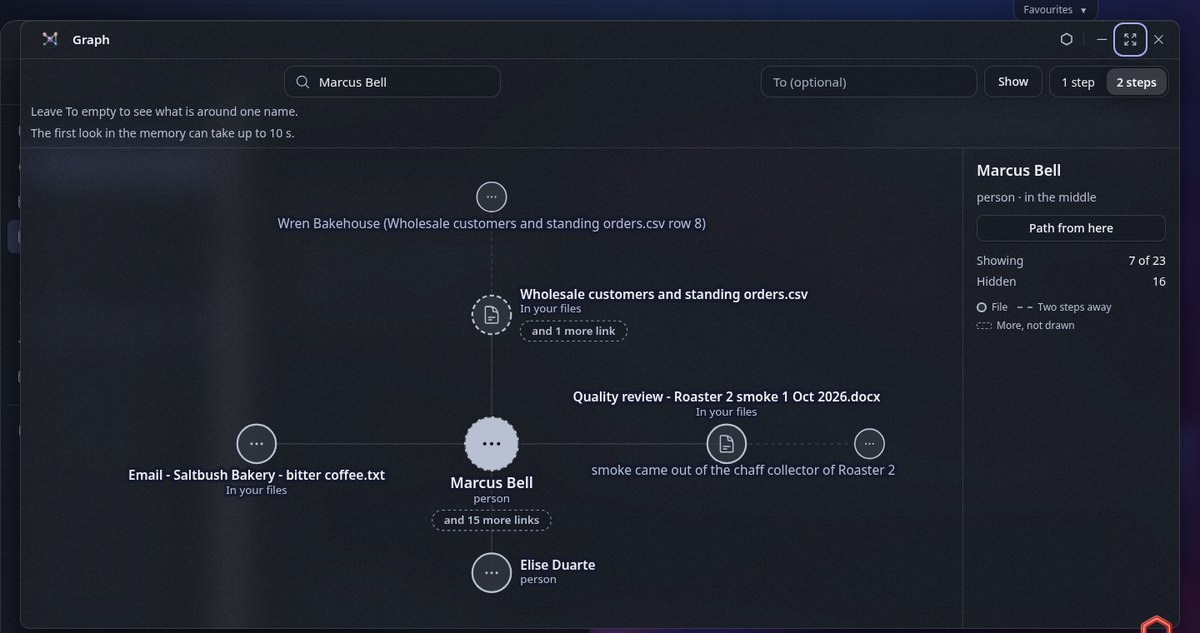
Asked: "Who owns each action from the Roaster 2 quality review, and when is each due?" A real answer from our demo, 4 Nov 2026, on a made-up company's files. Gemma 4 (26B) ran on the demo server's own processor, with no outside AI. 14 seconds. Each action names the quality review it came from.Asked: "What price did Fernhollow pay for lot GL-0417?" No file gives that price, and it made none up. 12 seconds.Asked: "How much coffee a week will Saltbush Bakery take from November, and does the customer list show that yet?" Partly right: 15 kg a week from Friday 6 November, and the customer list still shows 12 kg, each line from its own file; it left out that deliveries stay on Fridays. 10 seconds.Asked: "What did Fernhollow promise Saltbush Bakery about the bitter coffee?" Partly right: every promise is there, each with its file; it left out that Marcus Bell wrote it on 5 October. 13 seconds.The Graph app on the same files. One person, Marcus Bell, joins three of them: a reply to a customer, the quality review and the customer list. A real screen from our demo, 4 Nov 2026, on the made-up company's files.
We asked it 12 questions and marked the answers ourselves: 2 fully right, 9 partly right, 1 wrong. Nothing it showed was made up. What is still missing: answers often leave out details the files hold; twice BOS said the files did not hold something they did; once a file held the answer and BOS gave none.
A minute of BOS.
Real BOS screens from our demo, on a made-up company's files. The voice is an AI voice.
Already in the box
Apps every company needs, already in the box.
Calendar
Your month at a glance. Add and remove events, see when two of them clash, and see what is up next on your desktop. Entries can repeat (every other week, the 2nd Tuesday, the last Friday, yearly) and remind you, and sharing an entry asks first who will see it.
Files
Folders, upload and download, drag and drop, a preview pane and a Bin with Undo. Pictures, recordings and videos play right in the window.
Documents
Word documents, PDFs, Markdown and plain text open in one reader. Text, Markdown and CSV files can be edited and saved in place.
Tasks
Lists with due dates and times and repeats. A task can be about a calendar entry or a record.
Ask BOS
Ask about your company and get answers from its own records, with files attached, in chats kept in groups. A Daily Brief shows what today holds and what changed, each line with where it came from.
Search
One search across your files, your people and your records.
Graph
The Graph window draws the people, companies and other things your files name, and how they link. Let a file into memory and its new dots appear. Give two names and it shows the path between them.
Relationships (CRM)
Companies, people, deals and notes, linked. Deals on a board by stage. Every change keeps who made it and what was there before. Likely duplicates can be merged.
Books, an early version
Inside Relationships: a chart of accounts, entries that must balance, a trial balance, profit and loss and a balance sheet. A won deal makes a draft invoice. Shown with made-up books.
Settings
Each person picks light or dark, banners and sounds, and which AI helpers are on. A Librarian can turn a helper, or all outside AI, off for everyone.
People and sharing
Add your team and decide who sees what. Nothing is shared until someone shares it, and every act of the Librarian is logged.
On any screen
A desktop in the browser, on a computer or a phone, in light or dark, and it can be used from the keyboard.
Fusion: your files in one app
No separate app for each kind of file. Word, PDF, spreadsheets, text and pictures open in Fusion, and every version is kept.
One app for your files
Word, PDF, spreadsheets, Markdown, text and pictures open in one app, Fusion: each file in its own window, or as a tab if you choose. Close a tab by mistake? Ctrl+Shift+T brings it back.
History and Restore
Every save keeps what it replaced. Open a file's History and bring back any earlier version.
What changed
Compare a file with one of its earlier versions and see, in words, what was taken out and what was put in.
Edit Word documents
Change a paragraph, a list or a header in a Word file and save. The old words go to History, with Undo.
Cover before sharing
Make a copy of a text or Word file with chosen words covered. In a Word file that includes headers, footers, comments, hidden text and the file's details.
Answers you can check
BOS answers from your own files, and each answer shows where it came from, so you can check it.
Every answer names its source
Each answer names the file it came from. Open it from the answer and confirm it yourself.
Answers with no AI
Some questions BOS answers itself from your records, with no AI model at all; when that answer comes from one of your files, it shows that file, so you can open it and confirm.
One switch for the AI
Turn every AI model off. BOS still answers what it can from your records, and says when a question needs the AI.
Handy things
Small things that save time every day.
Search from anywhere
Ctrl+K (Cmd+K on a Mac) opens Search with your open windows first.
Copy link
Every window's menu copies a link to exactly what you are looking at.
On a phone too
Word files fit a phone's screen, and a Word file's outline becomes a Contents button.
Updates
BOS gets a new version several times a month, and you choose when to install it. On its first start, a new version makes a checked backup of your data before it changes anything; if it cannot, it does not start, and your data stays as it was. The version before stays installed beside it, so you can go back to it.
Ask for a feature
Want BOS to do something it does not do yet? Write to us at semurg@semurg.org, and say what you need it for. We read every request.
AI when you want it. Never required.
With your own local AI
The models run on your own servers: Google's Gemma today. Out of the box, every reading of your data is done by a local model. An outside model, such as Claude from Anthropic, is used only where you set one up, and one switch turns all outside AI off. BOS answers from your own records and drafts notes for a person to approve.
With no AI at all
With no model chosen, every record, file, search and form still works, and BOS answers from what it can work out itself. Your data stays readable by people, never locked inside a model.
Your organisation decides: a Librarian picks the model for everyone, or lets each person choose their own.
Your server. Your data.
On servers you own or rent
BOS runs on servers you own or rent, and your company's data stays on them, unless you choose to set up an outside AI model; one switch turns all outside AI off.
Closed by default
BOS listens only inside its own server. Nobody reaches it until you open a way in, such as your own private network. Our public demo is opened to the internet on purpose.
Locks when you step away
A sign-in locks after 10 minutes without use, or the time each person chooses, and on a computer soon after the browser is gone.
One memory underneath
Your records and the links between them live in Semurg, so people and apps work from the same facts.
Request demo access, or join the waitlist.
Request demo access
We show you BOS with a made-up company, then with your own questions.
We use this only to answer your request, or to tell you when you can join. How we keep your request
Join the waitlist
We write to you when there is room for your company.
We use this only to answer your request, or to tell you when you can join. How we keep your request
How we keep your request
What is kept
Your name, your email address, your company if you give it, your note if you write one, which form you used and when. The web server's logs keep a visitor's network address for 7 days. Your request itself is kept without it.
Where
On a server we rent from Cherry Servers in Chicago, USA. We do not sell your details. What our AI agents read goes to Anthropic, and our email goes through our email provider; no one else is given them.
Who sees it
The Semurg team, and the AI agents (Claude, from Anthropic) that help us run our servers.
How to be removed
Write to semurg@semurg.org and we delete your request within 7 days of your asking. A copy can stay in an on-server safety snapshot until newer snapshots replace it.
Where BOS stands
BOS is new, and we say so.
Each version is tested and checked before it is released, its known issues are written down, and it runs on our test server before it goes further.
Want to see it running? We will show you BOS live, with your questions.